Map every input
A/B/X/Y, bumpers, triggers, D-pad, both analog sticks and the L3/R3 clicks — all remappable to any keyboard key.
Gamepad to Keyboard is a free tool that maps every button, trigger and stick on your controller to real keystrokes and mouse clicks — so you can play keyboard-only games with a controller: emulators, browser games, retro classics and any PC title that never expected a gamepad.
Everything you need
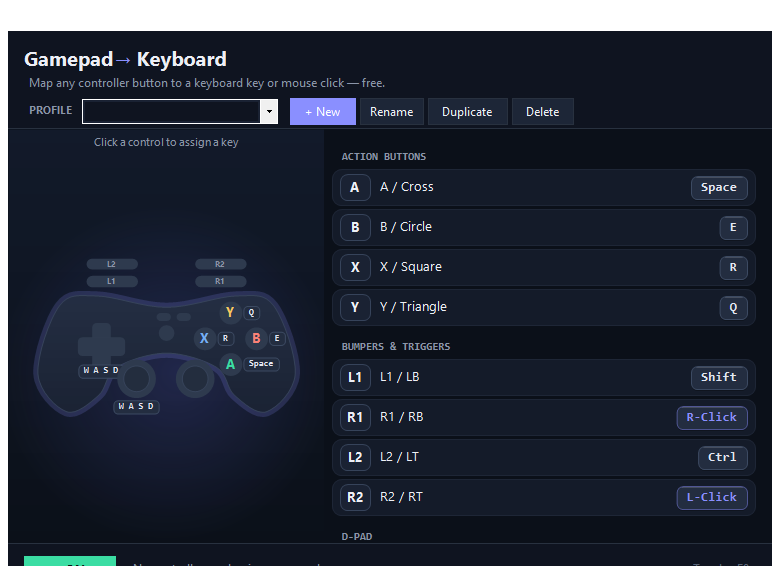
From face buttons to the tiniest stick-click, every input on the pad is yours to reassign. Bind it to a keyboard key or a mouse button, then save it as a profile you can switch to in a click.
A/B/X/Y, bumpers, triggers, D-pad, both analog sticks and the L3/R3 clicks — all remappable to any keyboard key.
Bind any button to a left, right or middle mouse click — aim, fire or point without touching the mouse.
Create, rename, duplicate and delete profiles — all auto-saved. Start from WASD Shooter, Retro / Arcade, Move + Mouse or a blank slate.
An on-screen pad mirrors your hands and lights up green the instant you press — you watch every mapping fire in real time.
Flip mapping on or off with one hotkey — no alt-tab, no leaving the game, no losing the moment.
It sends real keystrokes — nothing to install, no virtual controller injected. Just one portable .exe you can run anywhere.
Powered by SDL2, presses register the moment they happen — tight enough for shooters, platformers and fighting games.
MIT licensed and 100% free with no ads — a free, open-source alternative to reWASD you can read, fork and trust.
Broad hardware support
Whatever is on your desk plugs in and works. Xbox / PS4 / PS5 controller keyboard mapping runs on the same SDL2 engine that recognises hundreds of pads — wired over USB or paired over Bluetooth.
Series X|S, Xbox One and 360 pads — wired or wireless.
Plug & mapDualShock 4 and DualSense (PS5) — including touchpad click.
Plug & mapNintendo Switch Pro Controller, ready to remap.
Plug & mapThird-party and retro-style pads over USB or Bluetooth.
Plug & mapUnder the hood it's SDL2, the same controller library used across the games industry — so if your OS sees the pad, Gamepad to Keyboard can map it.
From zero to playing
No setup wizard, no config files. This is joystick to keyboard the way it should be — point, press, play.
Connect any controller over USB or Bluetooth. SDL2 detects it the moment it's live.
Click a button on the on-screen pad, then press the keyboard key or mouse click you want it to send.
Keep your layout as a named profile — or load a preset like WASD Shooter and tweak from there.
Toggle mapping on and your gamepad now types real keystrokes into any game or app.
Loved by players
“Finally playing my RetroArch library with a DualSense instead of the keyboard. Mapped the whole layout in about two minutes and the retro preset was already 90% right.”
“I have limited hand mobility and mapping the right stick to mouse plus buttons to clicks lets me play point-and-click games again. The live view makes it easy to see what I set.”
“Tried it as a free reWASD alternative and honestly it does exactly what I needed — no subscription, no account, no driver. Xbox pad to WASD for an old indie game, done.”
“Browser MMO with no gamepad support — now I run around with the left stick on mouse and skills on the face buttons. The F8 toggle is perfect for typing in chat.”
“Portable exe on my USB stick, works on every PC at the LAN café. Switch Pro pad mapped to a fighting-game layout and the input feels dead-on.”
“Set up a couple of profiles for different old games and switch between them instantly. Open source, no ads, no telemetry — exactly what I want on my machine.”
One download, one .exe, and every button on your pad becomes a key. No account, nothing to configure before it runs.
Free forever · No ads · No drivers · MIT licensed
Answers